Chapter 10: Quality & Acceptance
Quality assurance and formal acceptance testing are critical gates that must be passed before an identity authentication system is declared production-ready. This chapter defines the quality standards, acceptance test procedures, performance benchmarks, and documentation requirements that constitute a complete and compliant deployment. The quality comparison image illustrates the visible difference between a compliant, high-quality deployment and a non-compliant installation, providing a practical reference for field engineers and project managers.
10.1 Quality Comparison: Compliant vs. Non-Compliant Deployment
Physical deployment quality has a direct impact on system reliability, security, and long-term maintainability. The comparison image below illustrates the most common quality deficiencies observed in non-compliant deployments alongside the corresponding best-practice standards. Project managers should use this comparison as a visual checklist during site acceptance walks.
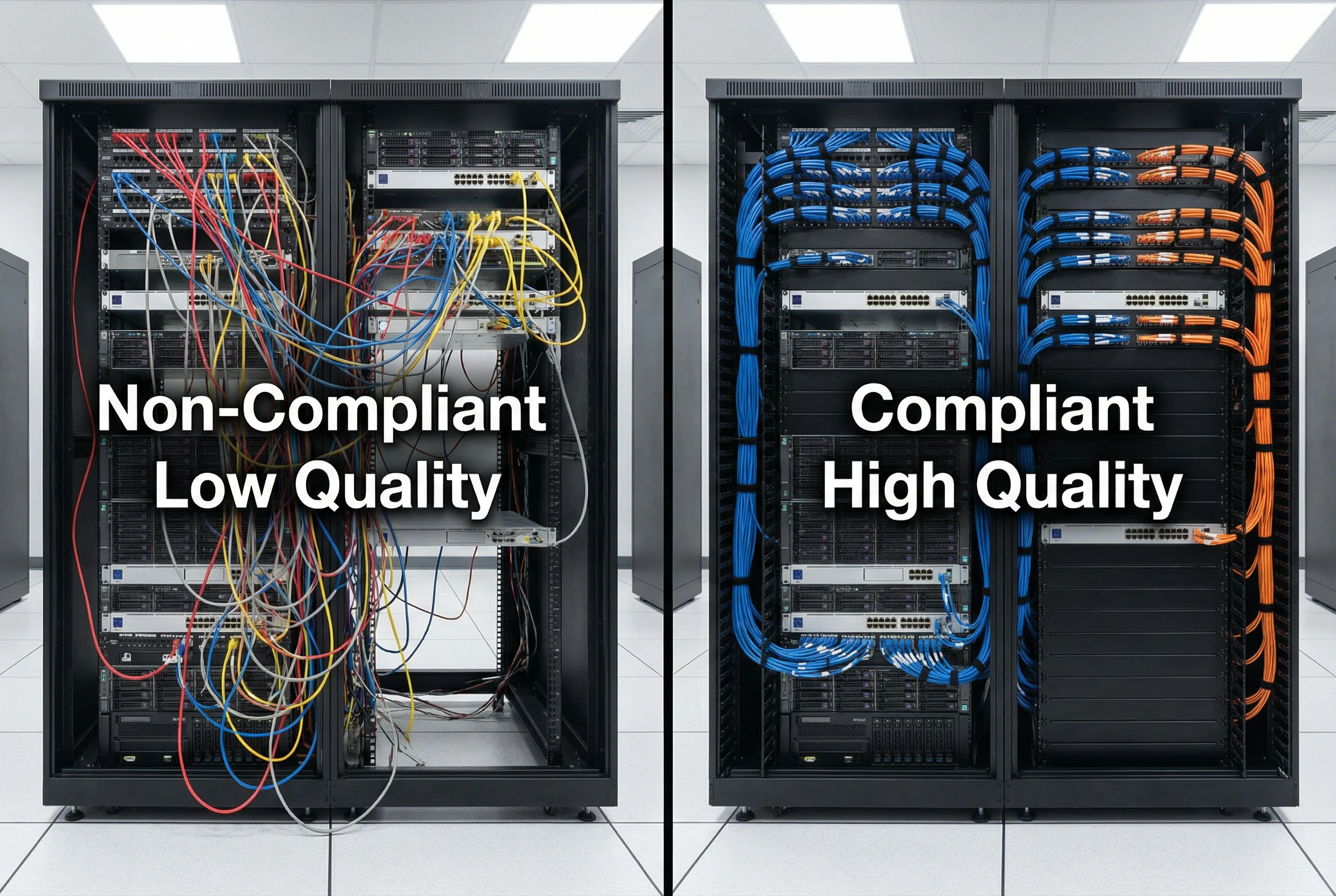
| Quality Dimension | Non-Compliant (Fail) | Compliant (Pass) | Impact of Non-Compliance |
|---|---|---|---|
| Cable management | Unmanaged, tangled cables; no labels | Color-coded, labeled, routed through cable managers | Troubleshooting time 3–5× longer; accidental disconnection risk |
| Rack blanking panels | Empty U spaces; no blanking panels | All unused U spaces filled with blanking panels | Hot-air recirculation; equipment overheating; 10–15°C temperature rise |
| Equipment labeling | No labels on ports, cables, or equipment | All ports and cables labeled with asset tags | Incorrect cable removal during maintenance; security incidents |
| Grounding | No visible rack grounding; mixed ground paths | Rack grounded to building earth; green/yellow ground cable visible | ESD damage to equipment; electrical safety risk |
| Power redundancy | Single PDU; no dual-feed | Dual PDU (A+B feed); each server on both feeds | Single power failure causes outage; no HA |
| Documentation | No as-built documentation; no port map | Complete as-built diagram; port map; cable schedule | Change management failures; extended incident response time |
10.2 Acceptance Test Procedures
Formal acceptance testing must be conducted by an independent test team (not the deployment team) using a documented test plan. Each test case must have a defined pass/fail criterion, and all failures must be remediated and re-tested before acceptance sign-off. The acceptance test report becomes part of the permanent project record and is required for compliance audits.
| Test Category | Test Case | Pass Criterion | Test Method |
|---|---|---|---|
| Authentication — Basic | Valid user with correct credentials authenticates successfully | Access-Accept returned; correct VLAN assigned within 2 s | Manual test with test account; verify VLAN assignment on switch |
| Authentication — Negative | Invalid credentials rejected | Access-Reject returned; no VLAN assigned; event logged in SIEM | Manual test with wrong password; verify SIEM event within 60 s |
| Certificate Validation | Revoked certificate rejected | OCSP returns revoked; Access-Reject within 300 ms | Revoke test cert in CA; attempt EAP-TLS auth; verify rejection |
| CoA — VLAN Change | Policy change triggers CoA and VLAN reassignment | Client re-authenticates; new VLAN assigned within 5 s | Change user group in AD; verify CoA sent and VLAN changed |
| HA Failover | Primary RADIUS failure causes seamless failover to secondary | Auth succeeds within 3 s of primary failure; no user impact | Shutdown primary RADIUS; attempt auth; measure failover time |
| Performance | System handles peak load without degradation | Auth success rate ≥ 99.9%; latency ≤ 500 ms at peak load | Load test with eapol_test or RadPerf; measure at 110% of design load |
| Audit Logging | All auth events logged to SIEM | 100% of auth events appear in SIEM within 60 s; correct fields | Generate 100 auth events; verify all in SIEM with correct format |
| Security Hardening | All hardening checklist items from Chapter 6 implemented | Zero P1 findings; zero P2 findings | Run hardening verification script; manual config review |
10.3 Performance Benchmarks and SLA Definitions
Performance benchmarks define the minimum acceptable performance levels that the identity authentication system must achieve under normal and peak operating conditions. These benchmarks should be incorporated into vendor contracts and service level agreements to ensure accountability. The following table defines the key performance indicators (KPIs) and their associated SLA targets.
| KPI | Minimum Acceptable | Target (Good) | Excellent | Measurement Method |
|---|---|---|---|---|
| Authentication Success Rate | ≥ 99.5% | ≥ 99.9% | ≥ 99.99% | RADIUS accounting logs; SIEM dashboard |
| Authentication Latency (p95) | ≤ 1,000 ms | ≤ 500 ms | ≤ 200 ms | RADIUS packet timestamps; eapol_test |
| OCSP Response Time (p95) | ≤ 500 ms | ≤ 300 ms | ≤ 100 ms | OCSP responder monitoring |
| HA Failover Time | ≤ 30 s | ≤ 10 s | ≤ 3 s | Failover test; measure from failure to first successful auth |
| System Availability | ≥ 99.9% (8.76 h/yr downtime) | ≥ 99.95% | ≥ 99.99% | Uptime monitoring; maintenance window tracking |
| Certificate Renewal Success Rate | ≥ 99% | ≥ 99.9% | ≥ 99.99% | CA renewal logs; SCEP/EST monitoring |
| SIEM Log Delivery Latency | ≤ 300 s | ≤ 60 s | ≤ 10 s | Timestamp comparison: event time vs. SIEM ingestion time |
10.4 Acceptance Documentation Requirements
A complete acceptance package must be assembled and signed off by both the project team and the customer representative before the system is handed over to operations. The acceptance package serves as the authoritative record of the deployment and is required for compliance audits, insurance claims, and future change management activities.
| Document | Content Requirements | Owner | Format |
|---|---|---|---|
| As-Built Network Diagram | Final IP addressing, VLAN assignments, physical port connections, firewall rules | Deployment Team | Visio / draw.io PDF |
| Acceptance Test Report | All test cases, results, pass/fail status, remediation notes, sign-off signatures | Test Team | PDF with signatures |
| Certificate Inventory | All issued certs: CN, SAN, expiry date, issuing CA, renewal method | PKI Team | Spreadsheet + PDF |
| Security Hardening Report | Hardening checklist results, findings, remediation status | Security Team | |
| Operations Runbook | Startup/shutdown, backup/restore, cert renewal, break-glass, escalation contacts | Deployment Team | PDF / Wiki |
| Vendor Support Contacts | Support portal URLs, case submission procedures, escalation paths, SLA terms | Procurement |