Chapter 7: Support & Integration
A network identity authentication system does not operate in isolation. It depends on a constellation of supporting systems — from directory services and PKI to SIEM, MDM, and ITSM platforms — each of which must be properly integrated, sized, and maintained to ensure the authentication system performs reliably. This chapter presents the complete integration ecosystem, defines the requirements for each supporting system, and provides guidance on dependency management, integration testing, and operational handoff.
7.1 Integration Ecosystem Overview
The integration ecosystem diagram illustrates all eight supporting systems and their integration protocols with the central identity authentication system. Each integration is bidirectional in nature, with the authentication system both consuming data from and providing data to its supporting systems. Understanding the full dependency graph is essential for change management, capacity planning, and incident response.
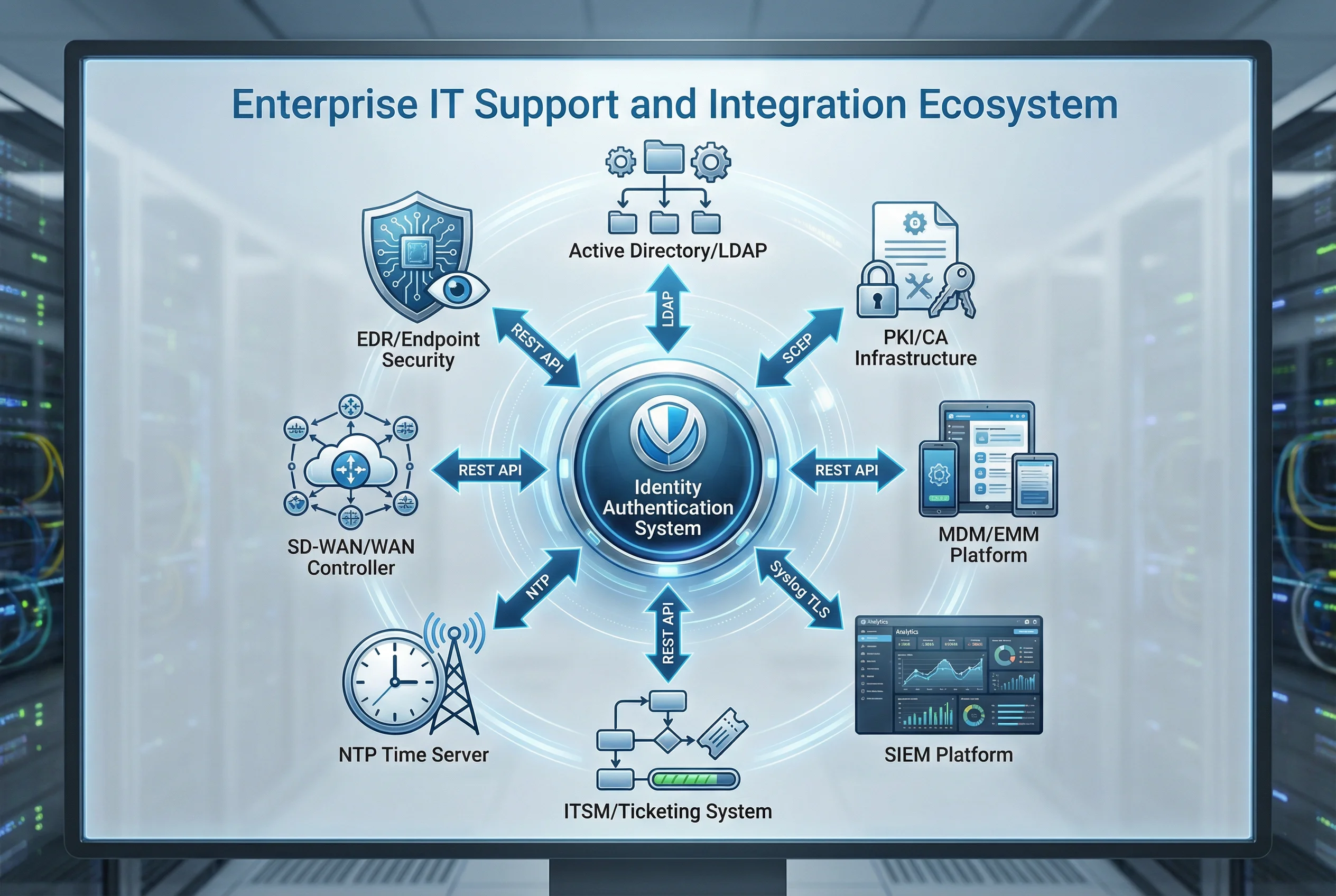
7.2 Supporting System Requirements
Each supporting system has specific requirements that must be satisfied for the identity authentication system to function correctly. The following table defines the minimum requirements, recommended configurations, and integration prerequisites for each supporting system. These requirements should be validated during the pre-deployment assessment phase and documented in the integration test plan.
| Supporting System | Integration Protocol | Minimum Version | Key Requirements | Failure Impact |
|---|---|---|---|---|
| Active Directory / LDAP | LDAPS TCP 636 | Windows Server 2016 / OpenLDAP 2.4 | TLS required; service account with read-only access; replication < 15 min | Critical — authentication fails without AD |
| PKI / CA Infrastructure | SCEP, EST, OCSP HTTP | Internal CA with SHA-256; OCSP responder required | OCSP response < 300 ms; CRL published every 24 h; sub-CA clustered | High — cert-based auth fails if OCSP unavailable |
| MDM / EMM Platform | REST API (HTTPS) | Vendor-specific; REST API v2+ | Device compliance API; real-time status; webhook support for CoA trigger | Medium — posture assessment unavailable; BYOD falls back to basic auth |
| SIEM Platform | Syslog TLS TCP 6514 | CEF or JSON log format; TLS 1.2+ | EPS headroom ≥ 30%; 180-day retention; NTP-synchronized; mutual TLS auth | Medium — audit logging fails; compliance gap |
| ITSM / Ticketing System | REST API (HTTPS) | ServiceNow, Jira, or equivalent REST API | Change ticket validation for PAM sessions; guest sponsor approval workflow | Low — manual approval fallback available |
| NTP Time Server | NTP UDP 123 | Stratum 2 or better; NTP authentication | Max offset < 100 ms; redundant NTP sources; NTP auth (MD5/SHA1) | High — Kerberos auth fails if clock skew > 5 min |
| SD-WAN / WAN Controller | REST API (HTTPS) | Vendor-specific REST API | RADIUS proxy configuration; site survivability policy; QoS for auth traffic | Medium — branch survivability affected during WAN outage |
| EDR / Endpoint Security | REST API (HTTPS) | Vendor-specific API; real-time status endpoint | Device health score; threat detection status; isolation capability via API | Medium — risk-based auth falls back to standard MFA |
7.3 Integration Testing Requirements
Integration testing must validate each integration point before production deployment. The test plan should cover both positive cases (expected successful integrations) and negative cases (failure modes and fallback behaviors). Integration tests must be repeated after any significant change to either the authentication system or its supporting systems.
| Integration | Test Case | Expected Result | Failure Mode Test |
|---|---|---|---|
| RADIUS → AD/LDAP | Authenticate user with valid credentials | Auth success; correct group returned | AD unavailable → RADIUS returns Access-Reject with proper error code |
| RADIUS → PKI/CA OCSP | Authenticate with valid certificate | OCSP check passes; auth success | Revoked cert → OCSP returns revoked; auth rejected within 300 ms |
| RADIUS → Switch CoA | Trigger CoA after policy change | Switch re-authenticates client; new VLAN assigned | CoA timeout → switch retains current VLAN; alert generated |
| NAC → MDM API | Query device compliance status | Compliance status returned within 2 s | MDM unavailable → NAC falls back to last known status; alert generated |
| All → SIEM | Generate auth event; verify in SIEM | Event appears in SIEM within 60 s with correct fields | SIEM unavailable → events buffered locally; replay on reconnect |
| All → NTP | Verify clock synchronization | All servers within 100 ms of NTP source | NTP unavailable → alert generated; Kerberos auth may fail after 5 min drift |
7.4 Dependency Management and Change Control
Changes to any supporting system can have cascading effects on the identity authentication system. A formal dependency management process must be established to evaluate the impact of changes before they are implemented. The change control process should require impact assessment for all changes to supporting systems, with a mandatory notification period and rollback plan for high-impact changes.
| Change Type | Impact Assessment Required | Notification Lead Time | Rollback Plan Required | Post-Change Test |
|---|---|---|---|---|
| AD schema change | Yes — full impact analysis | 5 business days | Yes — AD backup + restore procedure | Full authentication test suite |
| CA certificate renewal | Yes — cert chain validation | 30 days before expiry | Yes — keep old cert valid during transition | EAP-TLS auth with new cert |
| RADIUS software upgrade | Yes — compatibility check | 3 business days | Yes — rollback to previous version | Full auth test suite + SIEM verification |
| NTP server change | Yes — clock skew risk | 1 business day | Yes — revert to previous NTP source | Clock offset measurement on all servers |
| SIEM schema change | Yes — log format compatibility | 2 business days | Yes — revert log format | Log ingestion verification |