Chapter 8: Tools & Accessories
A successful identity authentication deployment requires not only the core authentication infrastructure but also a carefully curated set of accessories, tools, and supporting materials. This chapter presents the complete accessories inventory organized by category, covering hardware authentication tokens, network connectivity accessories, rack infrastructure components, diagnostic tools, and documentation requirements. Each item includes quantity guidance, selection criteria, and notes on compatibility with the core authentication system.
8.1 Accessories Inventory Overview
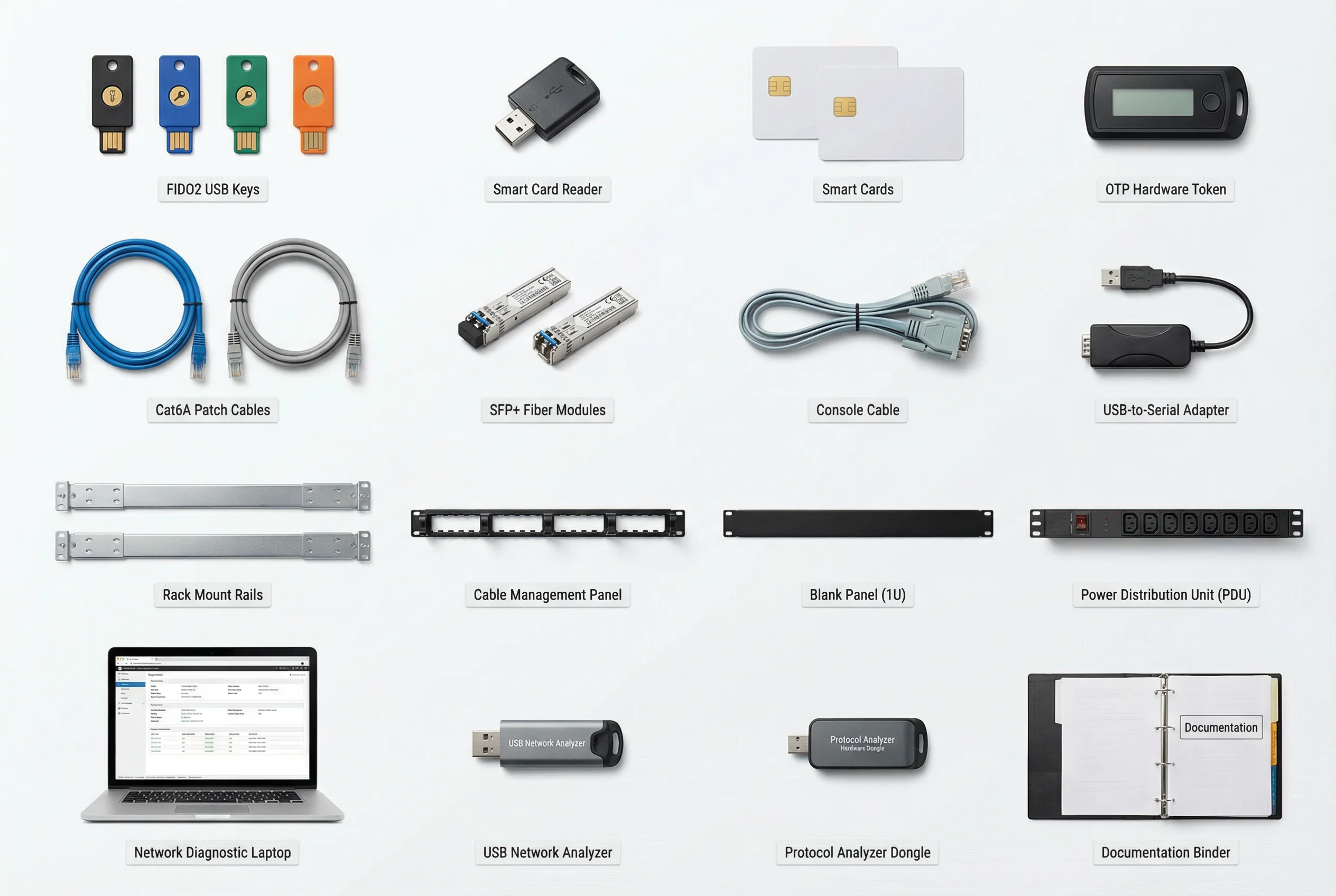
The accessories inventory encompasses all non-core items required for a complete, production-ready deployment. Items are organized into four categories: hardware authentication accessories, network connectivity accessories, rack and power infrastructure, and diagnostic and documentation tools. The inventory image below provides a visual reference for all accessory categories.
8.2 Hardware Authentication Accessories
Hardware authentication accessories provide the physical layer of multi-factor authentication for users and administrators. Selection of the appropriate hardware token type depends on the authentication protocol requirements, user population, and organizational security policy. The following table provides a complete specification and quantity guide for hardware authentication accessories.
| Item | Standard | Form Factor | Quantity Guidance | Compatibility | Notes |
|---|---|---|---|---|---|
| FIDO2 Security Key (USB-A) | FIDO2 / WebAuthn | USB-A key fob | 1 primary + 1 backup per privileged user | All modern browsers; PAM platforms; IdP (Okta, Azure AD, Ping) | Preferred for phishing-resistant MFA; FIPS 140-2 Level 2 variants available |
| FIDO2 Security Key (USB-C + NFC) | FIDO2 / WebAuthn / NFC | USB-C key fob with NFC | 1 primary + 1 backup per mobile user | iOS 14+, Android 7+, modern browsers | Dual-interface for laptop + mobile; preferred for BYOD users |
| Smart Card (PIV / CAC) | FIPS 201-2 PIV / ISO 7816 | Credit card size with chip | 1 per user in high-security environments | Windows Hello for Business; EAP-TLS; PAM platforms | Required for government/defense; certificate stored on card chip |
| Smart Card Reader (USB Desktop) | CCID / PC/SC | USB desktop reader | 1 per workstation using smart cards | Windows, macOS, Linux; all PIV-compatible software | Deploy at fixed workstations; not required if using FIDO2 keys |
| OTP Hardware Token | TOTP (RFC 6238) / HOTP (RFC 4226) | Key fob with display | 1 per user without smartphone access | All RADIUS/TOTP-compatible systems | Use only when FIDO2 not feasible; 30-second TOTP preferred over HOTP |
8.3 Network Connectivity Accessories
Network connectivity accessories ensure reliable physical connections between all authentication infrastructure components. Cable quality and proper labeling are critical for long-term maintainability and troubleshooting efficiency. All cables must be tested with a cable certifier before deployment to verify compliance with the relevant TIA/EIA standard.
| Item | Specification | Quantity Guidance | Use Case | Notes |
|---|---|---|---|---|
| Cat6A Patch Cable (Blue) | TIA-568-C.2 Cat6A; 28 AWG; RJ45 | 2× per server port + 20% spare | Server-to-switch connections in data center | Blue = data; use color coding consistently; test with certifier |
| Cat6A Patch Cable (Gray) | TIA-568-C.2 Cat6A; 28 AWG; RJ45 | 1× per management port | Management network connections | Gray = management; separate from data cables |
| SFP+ Fiber Module (SR, 10GbE) | IEEE 802.3ae; 850 nm; OM3/OM4 | 2× per inter-switch uplink (pair) | Core-to-distribution switch uplinks | Verify vendor compatibility before purchase; use matched pairs |
| Console Cable (RJ45-to-DB9) | Cisco-compatible rollover cable | 1 per rack + 2 spares per site | Out-of-band console access to switches/servers | Essential for initial configuration and recovery |
| USB-to-Serial Adapter | USB 2.0 to RS-232 DB9; FTDI chipset | 1 per technician laptop | Console access from modern laptops without DB9 port | FTDI chipset preferred for driver stability; test before deployment |
8.4 Rack and Power Infrastructure
Proper rack and power infrastructure ensures that authentication servers are physically secured, properly cooled, and protected against power interruptions. All rack-mounted equipment must be installed with appropriate rack rails, cable management, and power distribution to maintain airflow and enable efficient maintenance access.
| Item | Specification | Quantity Guidance | Notes |
|---|---|---|---|
| Rack Mount Rails (sliding) | Universal 19" EIA-310; 1U–4U adjustable | 1 pair per rack-mounted server | Sliding rails required for servers > 20 kg; verify rack depth compatibility |
| 1U Horizontal Cable Manager | 19" EIA-310; front + rear rings | 1 per 2U of patch cables | Install between patch panel and switch; prevents cable sag |
| 1U Blank Panel | 19" EIA-310; steel or plastic | Fill all unused rack U spaces | Required for airflow management; prevents hot-air recirculation |
| Power Distribution Unit (PDU) | Managed PDU; 20A or 30A; C13/C19 outlets; remote monitoring | 2 per rack (dual-feed A+B) | Managed PDU required for remote power cycling; dual-feed for redundancy |
| UPS (Rack-mount) | Online double-conversion; 10 kVA minimum; 15-min runtime at full load | 1 per rack or shared per row | Online UPS required for authentication servers; test transfer time annually |
8.5 Diagnostic Tools and Documentation
Diagnostic tools are essential for deployment verification, troubleshooting, and ongoing maintenance. The following tools should be available to the deployment team throughout the project and retained by the operations team for ongoing use. Documentation requirements are also specified to ensure that all deployment artifacts are properly recorded and maintained.
| Item | Type | Primary Use | Minimum Capability |
|---|---|---|---|
| Network Diagnostic Laptop | Hardware + software | RADIUS testing, packet capture, certificate validation | Wireshark, eapol_test, openssl, nmap; wired + wireless adapters |
| USB Network Analyzer | Hardware | Passive packet capture on 802.1X ports | 10/100/1000 Mbps; full-duplex capture; USB 3.0 interface |
| Protocol Analyzer Dongle | Hardware | RADIUS/TACACS+ protocol analysis | RADIUS, TACACS+, EAP protocol decode; export to PCAP |
| Cable Certifier | Hardware | Verify Cat6A cable installation quality | TIA-568-C.2 Cat6A certification; wiremap; length; NEXT/FEXT |
| As-Built Documentation | Documentation | Record final deployment configuration | Network diagrams, IP addressing, VLAN assignments, firewall rules, certificate inventory |
| Operations Runbook | Documentation | Day-to-day operations procedures | Startup/shutdown procedures, backup/restore, certificate renewal, break-glass procedure |